Showing posts with label iPad. Show all posts

August 12, 2014

100% Working in the latest version of Micromon
This cheat is only for iOS devices (iPhone, iPod, iPad) tested in iPod Touch running in 6.1.6 firmware and latest version of Micromon in this cheat you will get unlimited gold and diamonds and also you can have the exp multiplier but i don't use the exp multiplier because it will destroy the enjoyment of the game. With the Unlimited Diamonds you can have the super rare Micromons using the Lucky Spin (first you need to buy golden eggs using your diamonds) You can also have the other avatars and pets and specially the ultron. Unlimited golds is only for potions and other things you can buy on the market.

STEPS ON HOW TO HACK/CHEAT UNLIMITED GOLD AND DIAMONDS IN MICROMON

Step01: First You need to have a jailbroken iDevice (iPhone, iPod, iPad). If you want to jailbreak your iDevice click here for the latest tutorials.

Step02: You need to install iModGame on your iDevice using cydia. Click Here on how to install iModGame on your iDevice and get tons of cheats.

Step03: After installing the iModGame and acquiring the free mod points you can now activate the cheats on Micromon.


999999 Diamonds and Golds


Benefits having a Unlimited Diamonds

  1. Having unlimited diamonds you can buy Golden Eggs and use this on Lucky Spin to get Super rare Micromon and the strongest Micromon.
  2. You can buy chips with a 100% success rate in capturing wild Micromon on the field.
  3. Buying a Avatar will change your character.
  4. Pets are only following you but their cute.
  5. Others you can buy the ultron its like a super modern bike.

SUGGESTION


If you want to enjoy the game just turn off the XP Multiplier and Turn ON the Unlimited Gold and Diamonds that's what I do and i just get the rare Micromon using the Lucky Spin and I bought the Large Potions and Revive Potions in the market using the gold. You can also turn off the unlimited gold and diamonds but if you do this you will get - sign in your diamonds but it doesn't matter it will not affect the game it self.
This Hack/Cheat is a 100% working in the latest clash of clans versions
This Hack/Cheat is a 100% working on any iOS Device running in latest firmware and latest clash of clans version and this hack/cheat of Clash of Clans will only work in iOS devices and it will not work in all android phones, tablets running in android OS.

STEPS ON HOW TO HACK/CHEAT CLASH OF CLANS ON iOS

Step01: First You need to have a Jailbroken iDevice (iPhone, iPod Touch, iPad) If you need to jailbreak your iDevice Click Here for the latest tutorial.

Step02: You need to install iModGame on your device using Cydia Click Here on How to Install iModGame on your iDevice and get tons of Cheats.

Step03:  After installing iModGame and acquiring the free mod points you can now activate the clash of clans hack.

Benefits of this hack:
  1. Search Gold Loot
  2. Search Elixir Loot
  3. Search Dark Elixir Loot
  4. Search Trophy Loot
  5. Keep Active
  6. Simulate Attack


Search Gold Loot (Automatic Searching of Gold)
By Entering the required condition (Ex: 100000 Gold) when searching enemy clans it will skip searching less than the required condition (Ex: 100000 Gold) it will only search greater than or equal to the required condition. With this mod you can get more gold and you won't need to click the next search button when searching an opponent to attack.
Search Elixir Loot (Auto Searching of Elixir)
By Entering the required condition (Ex: 100000 Elixir) when searching enemy clans it will skip searching less than the required condition (Ex: 100000 Elixir) it will only search greater than or equal to the required condition. With this mod you can get more Elixir and you won't need to click the next search button when searching an opponent to attack.
Search Dark Elixir Loot (Auto Searching of Dark Elixir)
By Entering the required condition (Ex: 100000 Dark Elixir) when searching enemy clans it will skip searching less than the required condition (Ex: 100000 Dark Elixir) it will only search greater than or equal to the required condition. With this mod you can get more Dark Elixir and you won't need to click the next search button when searching an opponent to attack.
Search Trophy Loot (Auto Searching of Trophy)
By Entering the required condition (Ex: 1000 Trophy) when searching enemy clans it will skip searching less than the required condition it will only search greater than or equal to the required condition. This is the best way when you want to raise your trophy by attacking weak opponents with less trophy.
Simulate Attack
It is like a practice mode game it works in goblin and in revenge mode and specially in war game by visiting and scouting your opponent (Picks war base on battle day) and it will CRASH the game when battle ends. So that you know if you can defeat your opponent. Just turn off the Simulate Attack after you finish scouting your opponents to continue attacking. (it will always crash the game if you won't turn it off)
FOR BEST RESULTS

Just turn off the other search condition and focus just in one condition.

How to install iModGame for iPhone, iPod Touch, and iPad:
Step01: Go to Cydia and add the following source: http://cydia.imodgame.net/
Step02: Search for iModGame and install it.
Step03: Now tap on iModGame, you will see that you don’t have any Mod Points yet. Go to My Account on the top right corner, use your Gmail account to Regíter - > Login – click the Link Device then
click Thanks INVITER and type in 99187 to get 500 Free Mod Points.


That’s it. Enjoy hacking your favorite iOS games. You can visit http://imodgame.net/ to see what games do they offer and what you will get. Thanks for reading. Please share this post.

August 10, 2014

p0sixspwn v1.0.8 is released for Mac and Windows.

Earlier this month the developer of the p0sixspwn untethered jailbreak tool, Steven De Franco, otherwise known as iH8sn0w, confirmed that the standalone p0sixspwn tool has been updated to v1.0.8 with fixes for iTunes 11.1+ crashes. The update supports iPhone 3GS and iPod touch 4G running iOS 6.1.6. The latest version of p0sixspwn is available for both Mac and Windows.

Those interested will have to use Redsn0w to perform a tethered jailbreak and then install the p0sixspwn to convert the tethered jailbreak into an untethered version.

But with this latest released you don't need to jailbreak using redsn0w then p0sixspwn in this version you just need to have a  iOS 6.1.3 to iOS 6.1.6. and a p0sixspwn v1.0.8

Those who wish to jailbreak their iOS device untethered using the p0sixspwn (v1.0.8), may follow the step-by-step guide.

NOTE: I will not liable for any damage to the device. Before installing the untethered jailbreak, users are advised to verify their devices meet following requirements.

Points to remember
  • This guide is for iPhone, iPad and iPod touch running on iOS 6.1.3 to iOS 6.1.6. Navigate to Settings - > General - > About - > Version to check the software version of the device.
  • p0sixspwn tool is for untethered jailbreak.
  • Jailbreaking the iOS device will void manufacturer's warranty. And do not jailbreak the device to pirate apps from App Store.

Supported devices
P0sixspwn supports the following iOS devices
  • iPhone 3GS, iPhone 4, iPhone 4S, iPhone 5
  • iPod touch 4G and iPod touch 5G
  • iPad 2, iPad 3, iPad 4 and iPad mini
  • Mac OS X 10.6+ and Windows
Pre-requisites
  • Before performing the jailbreak, ensure that you have backed up all data of the device as this tutorial is likely to wipe out everything.
  • Disable passcode on the iOS device for the jailbreak process. Navigate to Settings - > General - > Passcode Lock - > Turn Passcode Off. Enable the Passcode once the jailbreak is installed on the device.
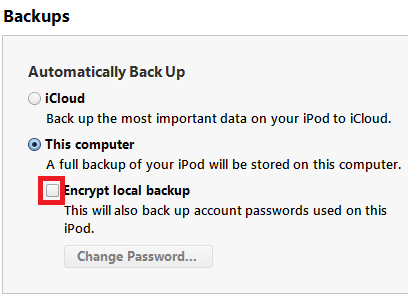
  • Uncheck Encrypt iPhone Backup option in iTunes for the jailbreak process. But ensure that you have enabled it after the jailbreak.
  • Verify the iOS device has above 80% battery. If the device powers off during the process due to the lack of battery, it could damage the device.

Steps to untethered jailbreak iOS 6.1.6 with p0sixspwn 1.0.8

Step01: Download the latest version of p0sixspwn jailbreak and save it on the desktop
Download links: Mac [Mirrors] or Windows [Mirrors]

Step02: Double click the downloaded file and extract the applicatio


Windows users- Extract p0sixspwn to the computer or C: drive or anywhere that you can see. Do not run it directly from the zip. Launch the application as an Administrator. Right-click on the exe file and select Run as Administrator.


Step03: Once p0sixspwn is launched, it will prompt to connect the iOS device to the computer


Step04: Connect your iOS device to the computer. p0sixspwn will show that the iOS device has been detected and the iOS firmware version


Step05: Click on Jailbreak button


NOTE: If your iDevice is not rebooting you can manually reboot your device just hold the power button then on the screen slide the button to power off.


NOTE: If you manually reboot your iDevice by power button it will not reboot just click the power button again to turn it on.


Step06: The jailbreak tool will give update about the jailbreak process, such as

Connecting to device...
Getting payload files from Apple.. (If this fails, your internet connection has issues...)
Gathering information to generate jailbreak data....
Sending initial data... [You should see Restoring in Progress on the iOS device]
Waiting to reboot. Do not unplug the device.
Waiting for device... [You should see the device has rebooted]
Remounting root....
Sending Cydia and untether payload to device to the device.... [After sometimes the device will reboot]
Your device is now jailbroken, it now preparing to reboot automatically.

Step07: when your iOS device rebooted, it should have been successfully jailbroken and Cydia icon should appear on the home screen of the device. Cydia might not be on the first page so search for it.


Troubleshoot issues

Mac users: If p0sixsown closes after rebooting the device on Mac, then try p0sixspwn v1.0.2.

Windows users: Extract the program to C: drive and run the program as an administrator.
Windows 8 users: who are still facing issues, try to run the app in Windows 7 compatibility mode. In order to change compatibility mode, right-click on the exe, click on Properties from the menu then click Compatibility tab. Check "Run this program in compatibility mode for" box and select Windows 7 from the menu.


In case you have issues jailbreaking the iOS device using p0sixspwn, you may try Redsn0w.

[Source: iPhoneHacks]

April 23, 2013


First you need to be jailbroken to use this cheat/hack

First: Open your CYDIA>Manage>Sources>Edit>Add
Then enter the following sources you need this to get the applications you need so that the cheat will work.
  • http://cydia.crazydoraemon.com/
  • http://cydia.imodgame.net/
  • http://itiaprepo.com/alex793/
  • http://ihacksrepo.com/
After Adding this sources go to Search then search the following applications then install.
  • iapfree
  • iapfree core plugin 1.9.1
  • imodgame  
  • localiapstore  
My iapfree is version 3.2.2 their is a v3 but its not working with me so im using version 3.2.2 and my locallapstore version is 1.3.1

Second: Open imodgame application then Account Tab> Enter your Gmail to create an account.
Linked your iOS device by clicking the button in your account tab then
click the SAY THANKS TO INVITER and enter this code 99187 to get free points and you will use this in getting the cheat in unlimited moves.

Do what i did to get points :)

How about the Unlimited Money?
First: Go to Settings on your iOS Device then look for LocallAPStore Tab then enable it


Proofs that its working for me im on iPod Touch 4th Gen iOS 6.1

I just bought the 3 items it Yeti Store and some power ups during the game (i bought the power ups many times)


Heres the unlimited moves first you can see i have a 0 score with 50 remaining moves then on the second picture i have a score and 50 remaining moves.


NOTE: Their is a stage that you need to use all your moves to finish the game so in this case just disable the unlimited moves in your imodgame to finish that stage :) don't worry you can always buy a +5 moves during the game if you want to get a high score.

enjoy candy crush!!.

If you can't install via Cydia heres my Deb files
LocallAPStore v1.3.1: http://q.gs/47T9w
IAPFree v3.1.1: http://q.gs/47TC6

September 18, 2011

In this tutorial I'm using an iPod Touch 4G 32gb Version 4.3.3 using JailbreakMe 3.0 and you will learn how to jailbreak your iDevice in a simple steps using jailbreakme 3.0.

Thanks to Julie Anne Pereras for her iPod Touch

July 7, 2011

What You Need?
  • Your iDevice
  • Wi-Fi Connection
  • Mobile Terminal
  • Cydia - Latest Version can be Found Here
  • WinSCP

June 12, 2011

Most of the popular and needed most applications are in Cydia and those applications are not free so what we need is a Wi-Fi to open Cydia and Specially a Paypal account with funds to buy the application you need.

For me I will buy the Resupported4 for my iPod Touch 4th Gen and this application is needed to use my third party AV Cable for my ordinary TV.

Heres a Easy tutorial on how to buy applications in Cydia.


First go to Cydia and look for your applications you want to purchase, for me I will buy for the Resupported4 so as you can see at the image their is a Purchase Package and the Cost of the Application button, just click on the button. by the way their are some applications that you can use the 10-day full trial to see if the application will work for your iDevice just click the Install Button at the top right corner of the page.


May 31, 2011

Like my Gameboy Advance Emulator on my iPod Touch I also found this very useful emulator for ipod/iphone/ipad to play your favorite old games on Playstation One and with this emulator imagine that your playing your Final Fantasy VII on your iPod or iDevices i think that's cool it's looks like you bring your PSOne in your pocket.

The Bad thing about this emulator was the PSOne Roms are so huge in size like for example the Final Fantasy VII is i think theirs a four disk to play the whole game and one disk or one game rom of the emulator is having a 100mb to 400mb of size and it depends on the game you are downloading like the Theme Park on the Screenshots it is 123mb in size so if your having a iPod having 8gb of memory its so hard to store more games in your iPod or iDevices but still you can play them one by one or changing every time you finish the game.

To play the PSOne games on your iPod or iDevices you need to install first the PSX4All 4.0.10 Cracked and you can find it on cydia and you just need the repository of hackstor to download the cracked version of the PSX4All for you iPod or iDevices just add on your sources http://cydia.myrepospace.com/hackstor/ and then after installing the repository on your cydia go to search tab and type in PSX4All 4.0.10 Cracked just follow the written tutorial on the cydia.


filed under: , , , , , ,
I Accidentally found a gameboy advance emulator for my iPod Touch 4th Gen because i'm searching what are the best games for iPod Touch and I found this emulator one of the forum that i'm using for my iPod Touch and I tried to install in on my iPod Touch and now I'm playing my old games on my iPod Touch like mario, pokemon, zelda, sims, and other games that i can remember.

So if you want to have this application you just need an internet connection a wifi of course to connect to cydia and then you need a repository like the sinful phone to download the full crack of the gameboy advance emulator just add the http://sinfuliphonerepo.com/ on your cydia sources and then on the search tab type gpSPhone Cracked this is what I'm using for my iPod Touch 4th Gen Version 4.2.1 if you want you can try other's crack on cydia but this crack is what I'm using and it's working for my iPod.


filed under: , , , , ,

May 7, 2011

What You Need?

May 4, 2011

What do you need?

filed under: , , ,
What do you need?

filed under: , , , ,
Copyright © 2013 iamjasonangel | Powered by Blogger
Follow Me: Twitter
Blogger Template by jasonangel | Facebook